Keep BreakTimer if…
You want a free timer with a small set of understandable controls.
Explore BreakTimer ↗ ScreenSky
 THE 2027 GUIDE · Simple break scheduling
Choose ScreenSky for tasks and wellness prompts, Stretchly for mini and long breaks, or Time Out for more elaborate Mac scheduling.
Published by ScreenSky · Official sources checked 18 November 2026 · 2027 guide edition. Pricing and availability may change. Documentation comparison; no hands-on testing or performance ranking is claimed.
A GOOD REASON TO STAY
BreakTimer focuses on the essentials: intervals, break duration, working hours, advance notifications, and skip or snooze controls. That narrow scope is a strength.
BEFORE YOU SWITCH
The project explicitly offers no enterprise or commercial deployment support. A free download should not be read as a managed rollout service.
Start with the job you need done. Swipe the table on smaller screens. Prices retain the vendor’s currency; taxes and store offers may differ.
| App | What it does best | Pricing & update terms | Works on | Tradeoff to weigh | Choose it if |
|---|---|---|---|---|---|
 ScreenSky | Local tasks, quick capture, full-screen breaks, posture and blink reminders | $9.99 USD promotional price ($19.99 regular), one Mac with one year of updates; $99.99 Lifetime plan. 3-day trial.Verify pricing ↗ | Apple silicon Mac, macOS 14.4+ | Apple silicon Mac only. No phone sync, shared tasks or guided exercise library. Standard license includes one year of updates. | You want to return from a break knowing your next task. |
| BreakTimer | Working hours and straightforward scheduling | Free, open source under GPLv3.Verify pricing ↗ | macOS, Windows and Linux | The project explicitly offers no enterprise or commercial deployment support. A free download should not be read as a managed rollout service. | You want a free timer with a small set of understandable controls. |
 Stretchly | Cross-platform mini and long breaks | Free, open source; optional project sponsorship.Verify pricing ↗ | macOS, Windows and Linux | There is no subscription to eliminate by switching from Stretchly. A paid alternative needs to earn its place through a different workflow, not a savings claim. | Free software and cross-platform support are your priorities. |
 Time Out | Custom schedules, themes and scripted actions | Free core; direct supporter options $4.99 / 3 months, $9.99 / 6 months, $19.99 / 12 months; $79.99 lifetime.Verify pricing ↗ | Mac; current version 4 requires macOS 26, with an older release available | Supporter periods in the direct edition do not renew automatically. They unlock the features available during that period; do not confuse them with App Store subscriptions. | You enjoy configuring themes, rules and automation. |
 DeskRest | Posture alerts, break statistics and smart timing | Regular $24.99 / 1 Mac lifetime; checked Black Friday offer $5.00. Multiple-Mac plans available.Verify pricing ↗ | Mac, macOS 14.2+ | The checked promotion is temporary. Compare the regular price and included lifetime updates with the actual ScreenSky plan rather than treating a sale as permanent. | Break statistics and posture reminders are the main job. |
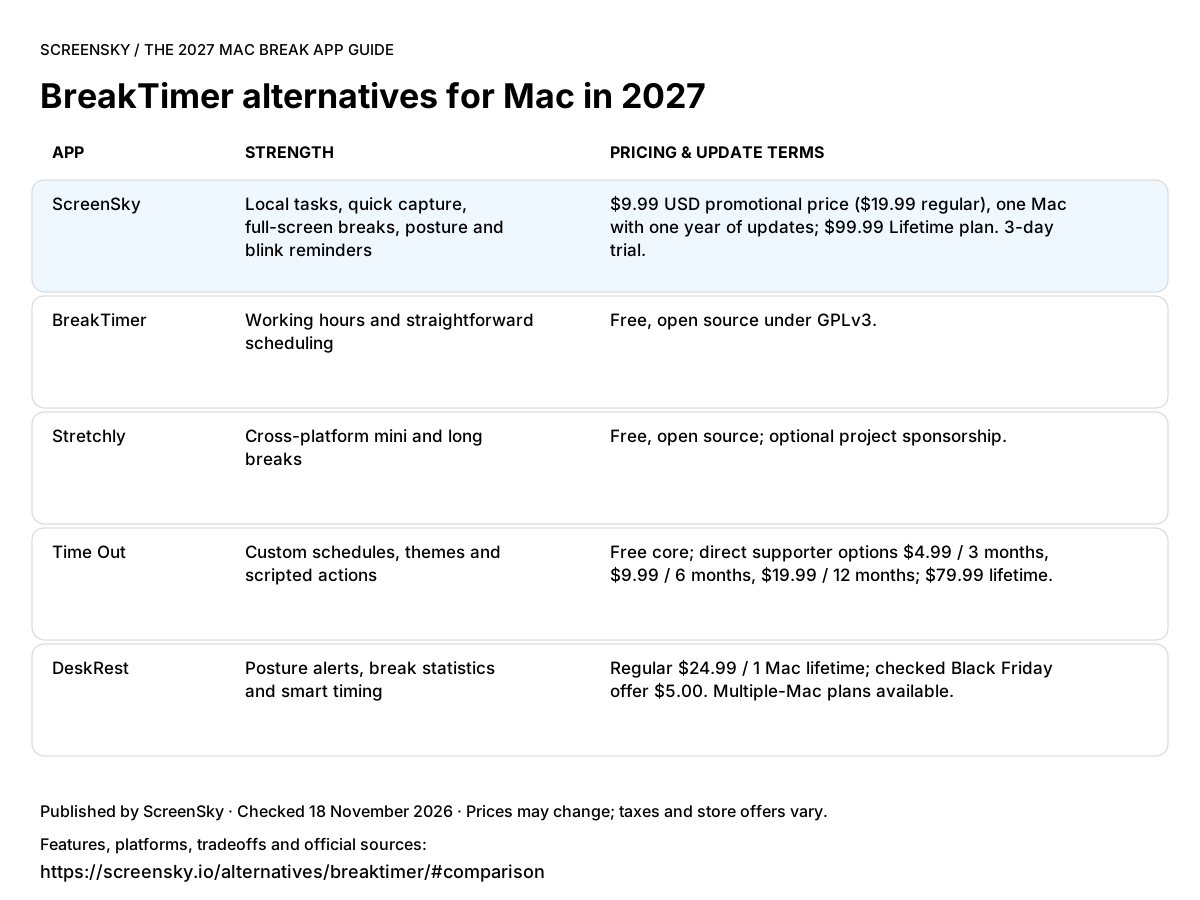
Use this image in your notes or article. Link back to the table so readers can check the sources and full terms.
Download comparison image ↓You want a free timer with a small set of understandable controls.
Explore BreakTimer ↗You need a task board and posture or blink prompts alongside scheduled breaks.
$9.99 USD promotional price ($19.99 regular), one Mac with one year of updates; $99.99 Lifetime plan. 3-day trial. Apple silicon only, macOS 14.4+. No phone or shared task sync.
Try ScreenSky for Mac ↗Free software and cross-platform support are your priorities.
You enjoy configuring themes, rules and automation.
Break statistics and posture reminders are the main job.
A CLOSER LOOK AT SCREENSKY
Move one task into In progress. Leave a note before your break. Return to that next step. ScreenSky keeps your board on your Mac, alongside screen breaks and posture and blink prompts.
Explore ScreenSky features ↗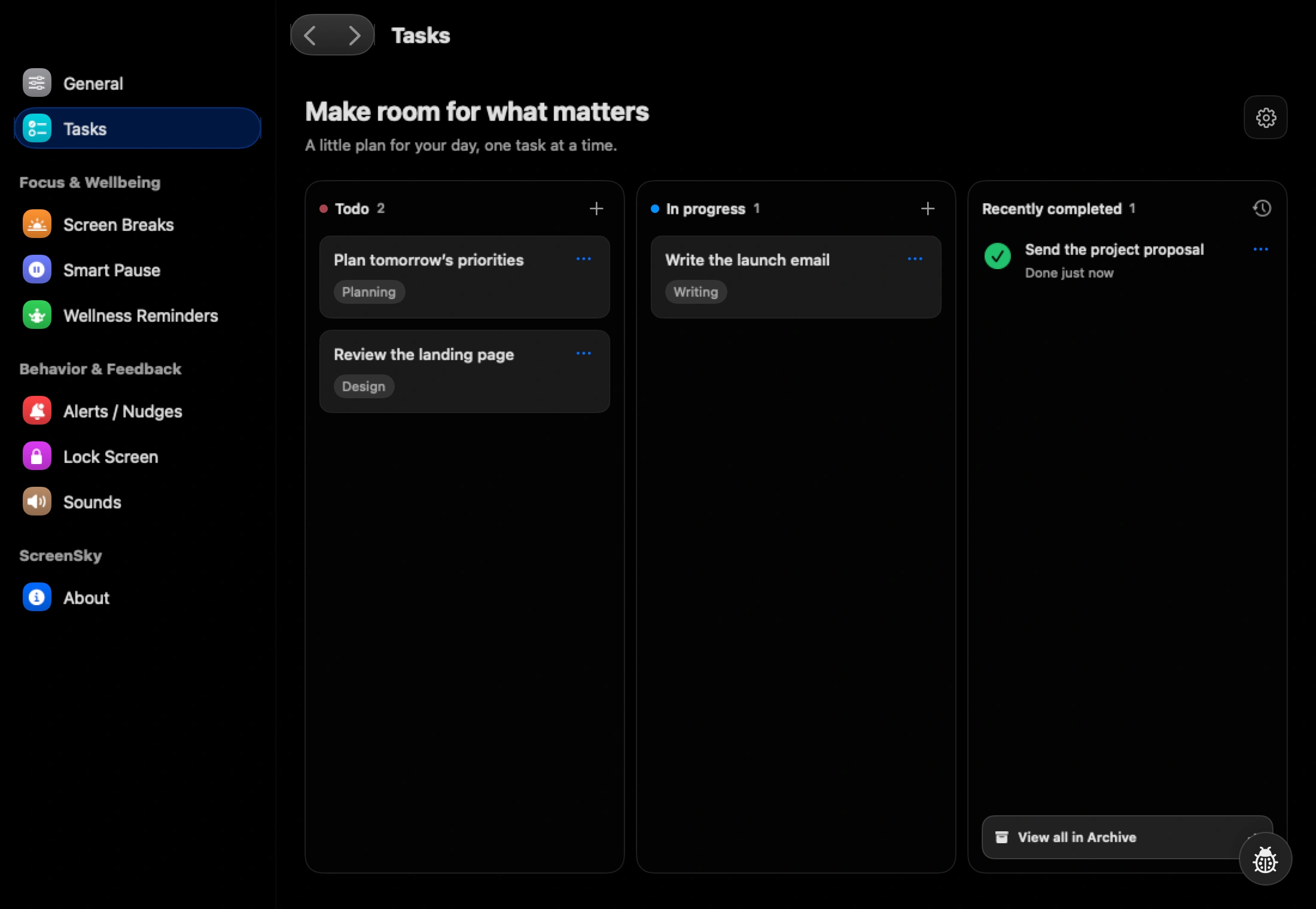
Pay only if you need the additional workflow. ScreenSky combines local tasks, quick capture and separate wellness reminders; basic scheduled breaks alone are already covered here.
This guide is published by ScreenSky and compares documented product features, not measured health outcomes. Recommendations reflect the needs described here. An undocumented feature is not necessarily unavailable. Official product and pricing sources were checked on 18 November 2026.