Keep StandLock if…
You need deliberate friction to make a break happen.
Explore StandLock ↗ ScreenSky
 is worth considering for task continuity and wellness prompts. Rest Time offers a simpler full-screen timer; Pandan suits people who prefer awareness over enforcement.
Published by ScreenSky · Official sources checked 18 November 2026 · 2027 guide edition. Pricing and availability may change. Documentation comparison; no hands-on testing or performance ranking is claimed.
A GOOD REASON TO STAY
StandLock is the most direct choice here when the problem is repeatedly dismissing breaks. Its Strict mode blocks keyboard and mouse input, with an emergency key combination.
BEFORE YOU SWITCH
Firm mode adds dismissal friction; Strict mode changes input behavior. Test the emergency escape and choose a level you can live with before relying on it for a whole day.
Start with the job you need done. Swipe the table on smaller screens. Prices retain the vendor’s currency; taxes and store offers may differ.
| App | What it does best | Pricing & update terms | Works on | Tradeoff to weigh | Choose it if |
|---|---|---|---|---|---|
 ScreenSky | Local tasks, quick capture, full-screen breaks, posture and blink reminders | $9.99 USD promotional price ($19.99 regular), one Mac with one year of updates; $99.99 Lifetime plan. 3-day trial.Verify pricing ↗ | Apple silicon Mac, macOS 14.4+ | Apple silicon Mac only. No phone sync, shared tasks or guided exercise library. Standard license includes one year of updates. | You want to return from a break knowing your next task. |
| StandLock | Gentle, Firm and Strict enforcement | Free, open source under MIT.Verify pricing ↗ | Intel and Apple silicon Mac, macOS 13+ | Firm mode adds dismissal friction; Strict mode changes input behavior. Test the emergency escape and choose a level you can live with before relying on it for a whole day. | You need deliberate friction to make a break happen. |
| Rest Time | Activity-aware full-screen pauses | $12.95 direct; 14-day trial. Upgrade and multi-user options differ.Verify pricing ↗ | Intel and Apple silicon Mac; current release macOS 13+ | Rest Time documents an emergency unlock and multi-display breaks. Test the break experience before buying rather than assuming every full-screen timer has identical controls. | You want a focused full-screen break timer with activity monitoring. |
| Pandan | Session awareness without a forced stop | Free.Verify pricing ↗ | Mac; current release macOS 26+, older versions linked by developer | A session history is not a task board. Equally, a break overlay is not a substitute for historical time awareness; decide which problem you are trying to solve. | You notice a timer and prefer to decide for yourself when to stop. |
 BreakTimer | Working hours and straightforward scheduling | Free, open source under GPLv3.Verify pricing ↗ | macOS, Windows and Linux | The project explicitly offers no enterprise or commercial deployment support. A free download should not be read as a managed rollout service. | You want a free timer with a small set of understandable controls. |
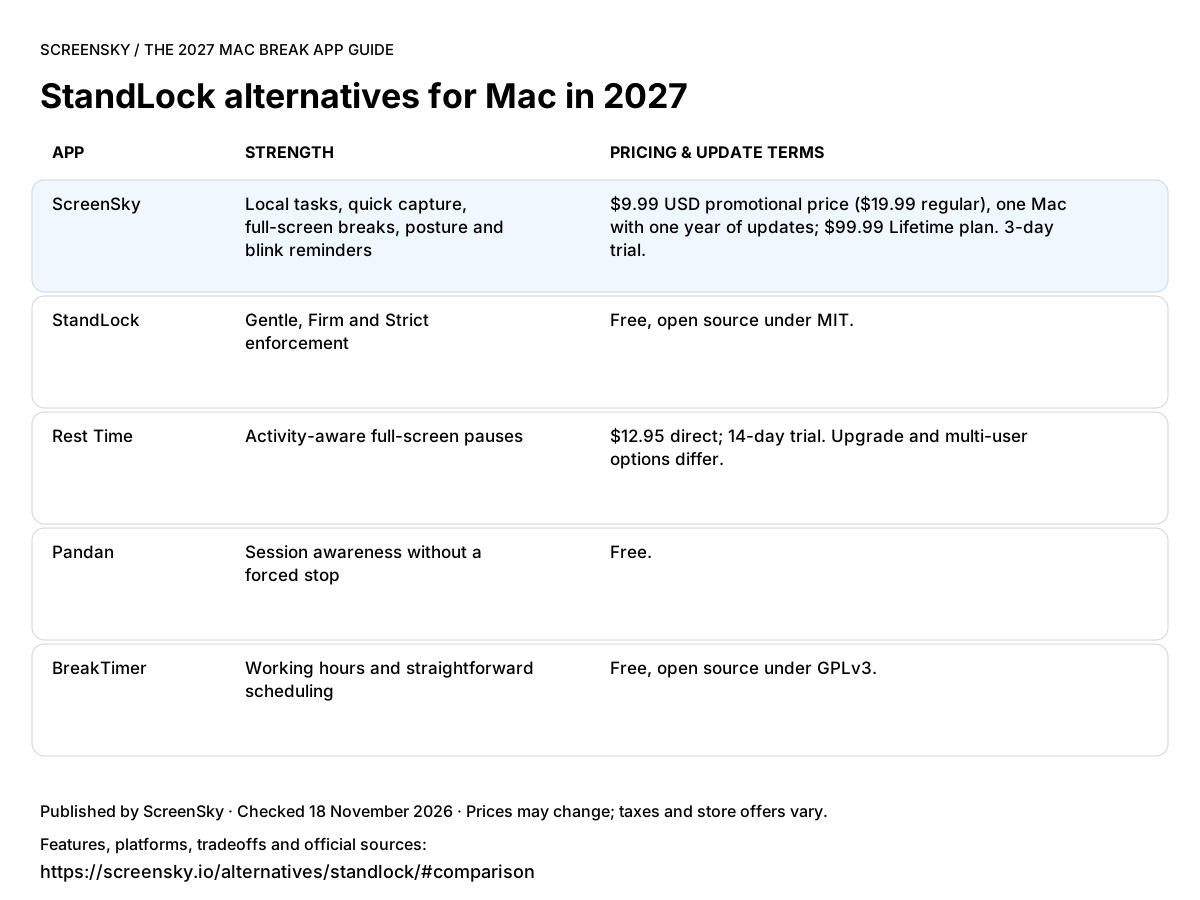
Use this image in your notes or article. Link back to the table so readers can check the sources and full terms.
Download comparison image ↓You need deliberate friction to make a break happen.
Explore StandLock ↗Your priority is organizing work and returning to one next step after a pause.
$9.99 USD promotional price ($19.99 regular), one Mac with one year of updates; $99.99 Lifetime plan. 3-day trial. Apple silicon only, macOS 14.4+. No phone or shared task sync.
Try ScreenSky for Mac ↗You want a focused full-screen break timer with activity monitoring.
You notice a timer and prefer to decide for yourself when to stop.
You want a free timer with a small set of understandable controls.
A CLOSER LOOK AT SCREENSKY
Move one task into In progress. Leave a note before your break. Return to that next step. ScreenSky keeps your board on your Mac, alongside screen breaks and posture and blink prompts.
Explore ScreenSky features ↗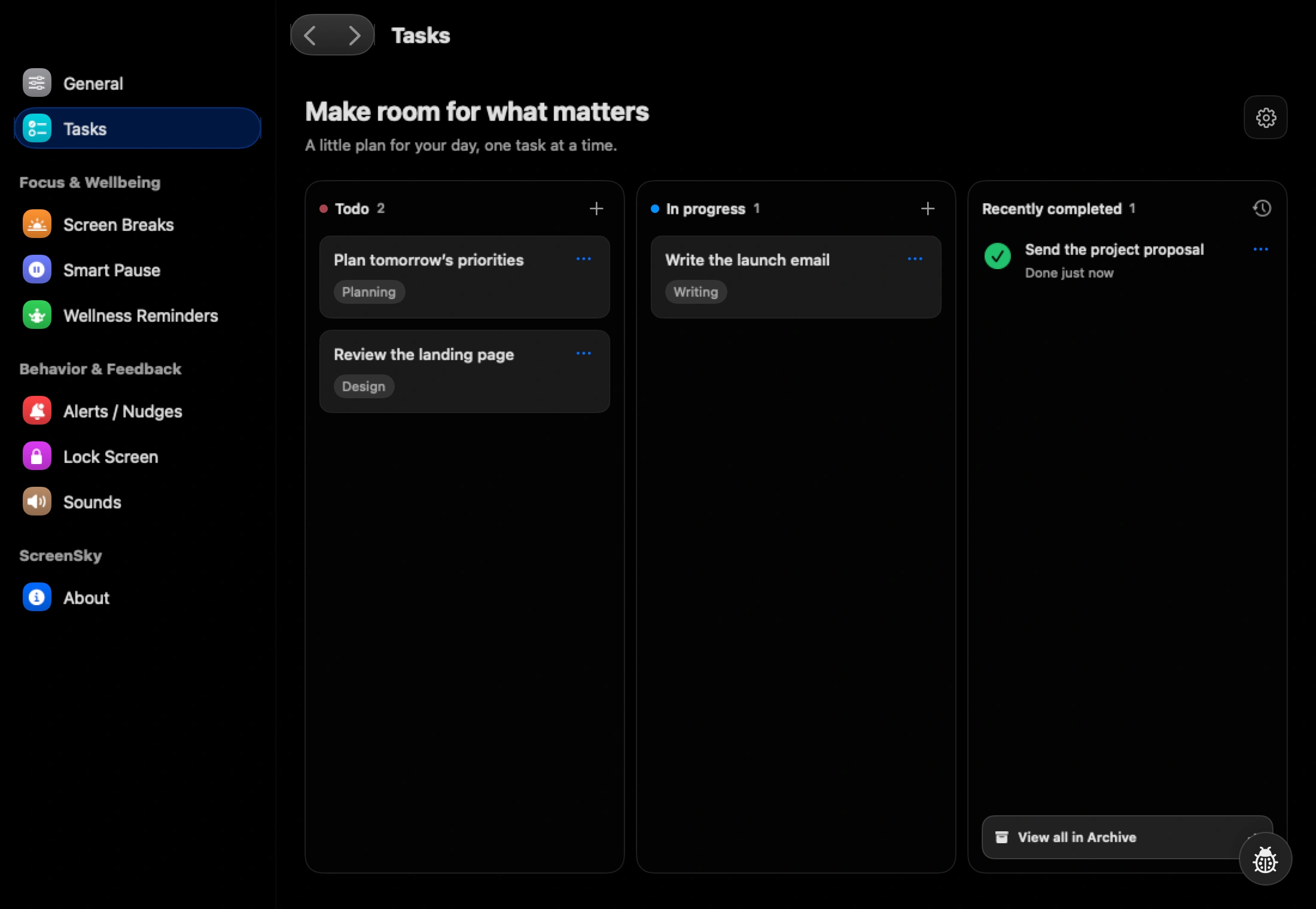
No. Covering the display and blocking keyboard/mouse input are different behaviors. StandLock documents input blocking for Strict mode; do not infer the same from another app’s full-screen appearance.
This guide is published by ScreenSky and compares documented product features, not measured health outcomes. Recommendations reflect the needs described here. An undocumented feature is not necessarily unavailable. Official product and pricing sources were checked on 18 November 2026.