Keep Workrave if…
You use its stable Windows/Linux version or are prepared to evaluate a development build.
Explore Workrave ↗ ScreenSky
For a regular Mac installation, compare Stretchly or BreakTimer first if free cross-platform software matters. ScreenSky adds native Mac tasks; Restier adds guided breaks across desktop systems.
Published by ScreenSky · Official sources checked 18 November 2026 · 2027 guide edition. Pricing and availability may change. Documentation comparison; no hands-on testing or performance ranking is claimed.
A GOOD REASON TO STAY
Workrave is useful for a structured desktop routine with frequent microbreaks and exercises. The key Mac buying decision is release maturity, not its price.
BEFORE YOU SWITCH
The official download page distinguishes stable Windows/Linux releases from a less-tested macOS development port. A development build is not the same support promise as a stable Mac release.
Start with the job you need done. Swipe the table on smaller screens. Prices retain the vendor’s currency; taxes and store offers may differ.
| App | What it does best | Pricing & update terms | Works on | Tradeoff to weigh | Choose it if |
|---|---|---|---|---|---|
 ScreenSky | Local tasks, quick capture, full-screen breaks, posture and blink reminders | $9.99 USD promotional price ($19.99 regular), one Mac with one year of updates; $99.99 Lifetime plan. 3-day trial.Verify pricing ↗ | Apple silicon Mac, macOS 14.4+ | Apple silicon Mac only. No phone sync, shared tasks or guided exercise library. Standard license includes one year of updates. | You want to return from a break knowing your next task. |
| Workrave | Microbreaks, rest breaks and daily limits | Free, open source.Verify pricing ↗ | Stable downloads: Windows and GNU/Linux; Mac port in development | The official download page distinguishes stable Windows/Linux releases from a less-tested macOS development port. A development build is not the same support promise as a stable Mac release. | You use its stable Windows/Linux version or are prepared to evaluate a development build. |
 Stretchly | Cross-platform mini and long breaks | Free, open source; optional project sponsorship.Verify pricing ↗ | macOS, Windows and Linux | There is no subscription to eliminate by switching from Stretchly. A paid alternative needs to earn its place through a different workflow, not a savings claim. | Free software and cross-platform support are your priorities. |
 BreakTimer | Working hours and straightforward scheduling | Free, open source under GPLv3.Verify pricing ↗ | macOS, Windows and Linux | The project explicitly offers no enterprise or commercial deployment support. A free download should not be read as a managed rollout service. | You want a free timer with a small set of understandable controls. |
| Restier | Guidance during the break itself | €7.99/year or €19.99 lifetime for 1 device; 14-day trial.Verify pricing ↗ | macOS 11+, Windows 10+ and Linux | Restier prices per device and offers both annual and lifetime plans. Check device count when comparing it with a one-Mac purchase. | You want guidance during breaks across multiple desktop operating systems. |
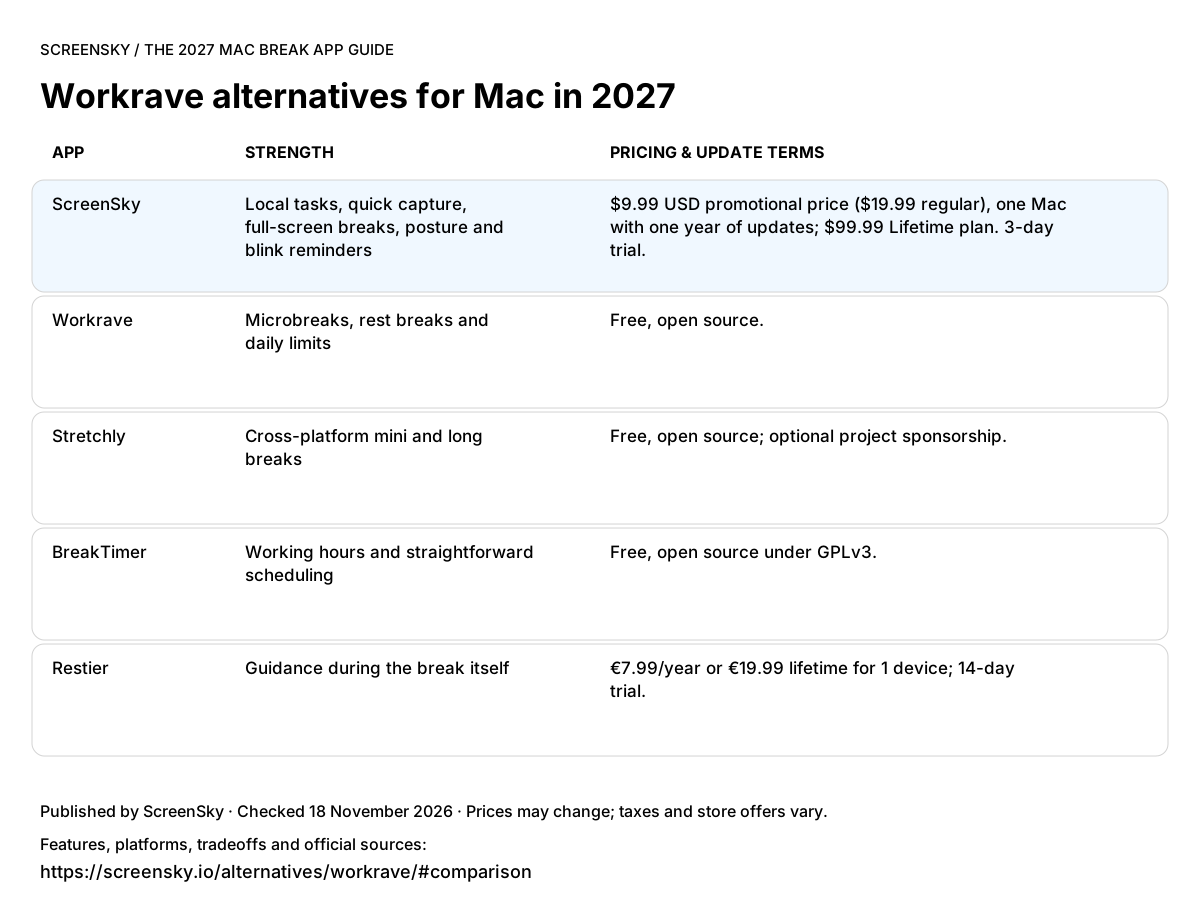
Use this image in your notes or article. Link back to the table so readers can check the sources and full terms.
Download comparison image ↓You use its stable Windows/Linux version or are prepared to evaluate a development build.
Explore Workrave ↗You want an Apple silicon Mac app with a supported installer and a local task workflow.
$9.99 USD promotional price ($19.99 regular), one Mac with one year of updates; $99.99 Lifetime plan. 3-day trial. Apple silicon only, macOS 14.4+. No phone or shared task sync.
Try ScreenSky for Mac ↗Free software and cross-platform support are your priorities.
You want a free timer with a small set of understandable controls.
You want guidance during breaks across multiple desktop operating systems.
A CLOSER LOOK AT SCREENSKY
Move one task into In progress. Leave a note before your break. Return to that next step. ScreenSky keeps your board on your Mac, alongside screen breaks and posture and blink prompts.
Explore ScreenSky features ↗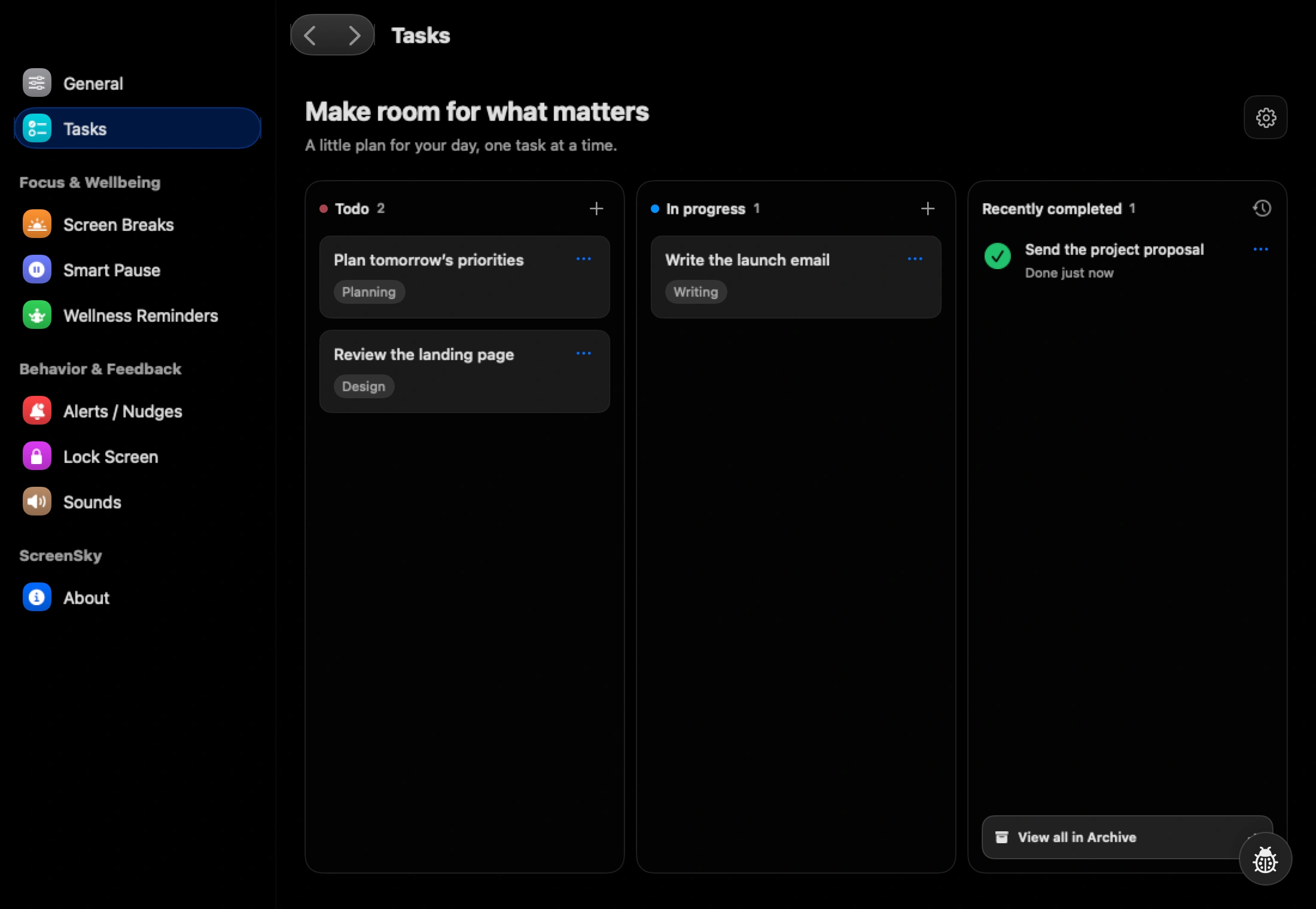
The checked download page lists stable Windows and Linux support and describes macOS as a development port that is less thoroughly tested.
This guide is published by ScreenSky and compares documented product features, not measured health outcomes. Recommendations reflect the needs described here. An undocumented feature is not necessarily unavailable. Official product and pricing sources were checked on 18 November 2026.